
What the Research Actually Says About Screens and Child Development
Sustainable digital wellness for families isn't about eliminating screens — it's about intentional boundaries, tech-free zones, and age-appropriate limits that protect mental health without constant battles.

In this article
Picture this: you're trying to tell your 10-year-old about your day and you glance up to realise they haven't made eye contact in four minutes. Now flip it — a 2024 Pew Research survey found that 46% of teens say their parent is "at least sometimes distracted by their phone" when the teen is trying to talk to them. The screen problem in most families runs in both directions.
The data from Lurie Children's Hospital's 2025 Family Media Survey makes the gap stark: children are averaging 21 hours of screen time per week, yet parents say 9 hours would be ideal. Something is clearly not working — and the gap isn't a willpower problem. It's a design problem. Screens are engineered to be compelling; families need equally well-designed counter-strategies.
In this guide you'll understand:
1. What the Research Actually Says About Screens and Child Development
The honest answer is nuanced: screen time is not uniformly harmful, but heavy or unstructured use carries real risks — and those risks grow with age.
The CDC's October 2024 analysis found that teenagers who spend four or more hours daily on screens show roughly double the rates of anxiety (27% vs 12%) and depression (26% vs 9.5%) compared to lighter users. A landmark 2025 study in JAMA tracked 4,300 children over four years and found approximately 40% developed high or escalating "addictive" patterns of device use. Children in that persistent-use group were two to three times more likely to develop suicidal ideation compared to low-use peers.
Sleep is another casualty. Blue light from screens suppresses melatonin production, delaying sleep onset — a mechanism well-documented in research published in the Journal of Clinical Sleep Medicine. For school-age children, even 30 minutes of screen use within an hour of bedtime is associated with measurably shorter sleep duration.
The Upside: Not All Screen Time Is Equal
Passive consumption (endless autoplay, social scrolling) carries the highest risk. Video calls with grandparents, co-viewing a nature documentary, or a child using an app to learn a language are qualitatively different. The American Academy of Pediatrics (AAP) distinguishes between "educational or relational" and "purely entertainment" screen time for exactly this reason.
2. Age-Banded Screen Time Guidelines: Newborn to Teen
One framework cannot serve a 6-month-old and a 15-year-old. Here's what current clinical guidance recommends, age by age.
Under 18 Months
The AAP recommends no screen time except video calls. Infant brains learn language and social cues from live human interaction; screens cannot replicate the back-and-forth contingency that drives early development. Even background TV affects language acquisition by reducing the number of words caregivers direct at babies.18–24 Months
If you introduce screens, the AAP advises high-quality programming only, and — crucially — watch together and narrate. Toddlers learn from screens only when a caregiver helps them connect what they see to the real world.Ages 2–5
The WHO recommends a maximum of one hour per day of sedentary screen time for 3–4 year-olds, with zero for under-twos (outside video calls). Keep content co-viewed where possible. Avoid screens in the hour before sleep.Ages 6–12
The AAP moves away from a hard hour limit for school-age children and instead recommends that screen time should not displace sleep (9–12 hours), physical activity (at least 60 minutes daily), homework, or face-to-face social time. A practical working ceiling many paediatricians use is 2 hours of recreational screen time on school days.Ages 13–17
Adolescent brains are particularly sensitive to social feedback loops. The AAP and the Royal College of Paediatrics and Child Health (RCPCH) both recommend ongoing family conversations over rigid limits, but agree that no phones in bedrooms overnight is one of the most protective rules a family can set. The RCPCH notes that screens should not routinely cut into sleep time.3. Creating Tech-Free Zones That Actually Hold
Tech-free zones work because they remove the decision entirely. You don't negotiate whether to check your phone at dinner if the phone isn't allowed at the table — full stop.
The Three Highest-Impact Zones
1. The dining table. Meals are one of the most reliably protective rituals in family life. Research from the National Center on Addiction found that teens who eat dinner with their families five or more times per week show significantly lower rates of substance use and better mental health outcomes. Screens at the table fracture the conversation that makes those meals protective.
2. All bedrooms, overnight. This single rule addresses blue-light sleep disruption, late-night social media use, and the anxiety spiral that comes from checking notifications at 2 a.m. Charge all devices — children's and adults' — in a common area.
3. The first 30 minutes after school. This transition window is when children most need to decompress and connect with a caregiver. A phone in hand during that window closes the door on the conversation before it starts.
Families should designate screen-free times of day or areas of the home — such as mealtime — to promote uninterrupted connection.
— American Academy of Pediatrics, Family Media Plan Guidance (2023)
Making the Rules Stick
4. Parental Controls: Choosing the Right Layer of Protection
Parental controls work best as one layer in a broader strategy — not a substitute for conversation, but a reliable safety net, especially for younger children.
App-Based vs. Network-Level Controls
App-based controls (installed on a child's device) are easy to set up but have a critical weakness: a motivated child can delete the app, use a VPN, or simply switch to a device that doesn't have it installed. Network-level controls, built into your home router, filter content before it ever reaches any device on your Wi-Fi — phones, tablets, smart TVs, and gaming consoles alike.
For families with children under 12, a parental-control router is the most robust option.


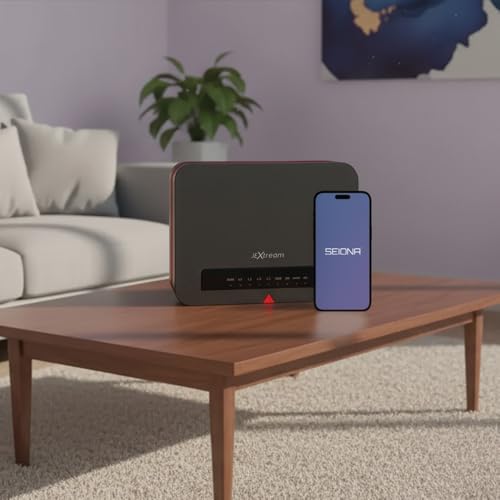

FX20 Parental Control Router + SEIONA App | Protect Every Device — Screen Time, App Blocking & Content Filtering | 3,000 sq ft | Can't Be Bypassed by Kids
- COMPLETE PARENTAL CONTROL SYSTEM FOR HOME + MOBILE: The JEXtream FX20 Wi-Fi router paired with the free SEIONA
- KIDS CAN'T BYPASS IT — NETWORK-LEVEL PROTECTION: Most parental control apps can be deleted or worked around by
- GEOFENCING & REAL-TIME LOCATION ALERTS: Know the moment your child arrives at school, leaves a safe zone, or r
The JEXtream FX20 pairs a network-level router with the SEIONA mobile app, which means rules follow your child even on cellular data away from home via geofencing. It's a strong choice for families who want one dashboard covering every device.
For larger homes or families already invested in a mesh network, the Gryphon AX WiFi 6 Router offers tri-band mesh coverage up to 3,000 sq ft per node alongside per-child profiles, time scheduling, and active content monitoring.




Gryphon Guardian Mesh WiFi Router and Parental Control System with Content Filters and Advanced Cyber Security
- AFFORDABLE CONNECTIVITY & SECURITY – Beef up your mesh network’s coverage, add extra security to your system,
- COMPREHENSIVE PARENTAL CONTROLS – Schedule screen time, monitor online searches and create a safe Internet exp
- WIFI WHERE YOU NEED IT – Enjoy reliable connectivity throughout your whole apartment or improve WiFi speeds in
Budget-conscious families or renters who don't need whole-home mesh will find the Gryphon Guardian a flexible entry point — it can run independently or extend an existing network, with the same core parental-control features at a lower price point.
5. Building a Screen Time Schedule That Reduces Daily Arguments
A schedule converts "can I have screen time?" from a negotiation into a known quantity — and known quantities generate far less friction.
The Building-Block Method
Start with non-negotiables that displace screens rather than compete with them: 1. Sleep hours (age-appropriate — see Section 2) 2. School / homework time 3. One hour of physical activity 4. At least one shared family meal
Whatever time remains can be divided into screen and non-screen blocks. For a typical school-day evening, most 8–12 year-olds end up with 60–90 minutes of recreational screen time — which aligns with clinical guidance.
Weekends and Holidays
Weekends are where schedules collapse. Build in a "screen anchor" — a fixed start time (e.g., after 10 a.m., after outdoor time) rather than open-ended access from wake-up. A TP-Link Deco S4 mesh system lets you schedule internet access windows per device directly from the app, so the router enforces the weekend schedule automatically rather than relying on willpower.


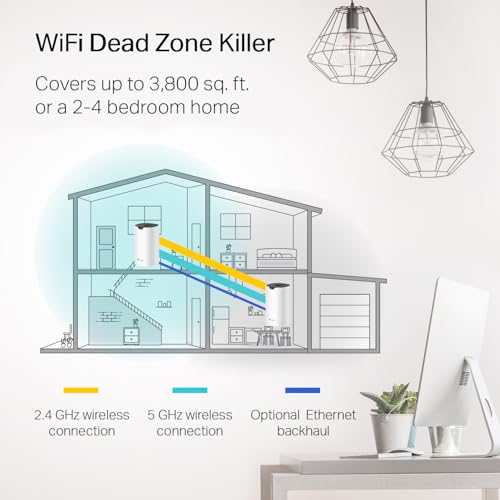
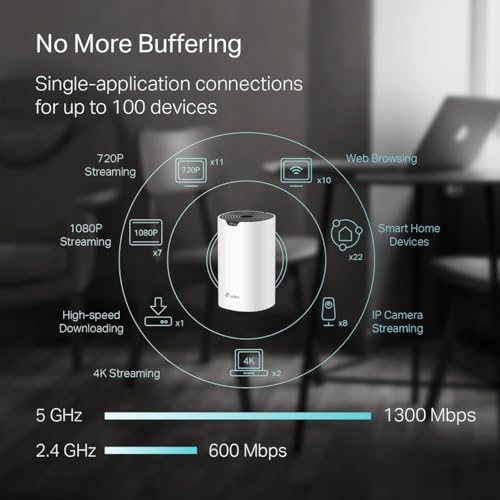
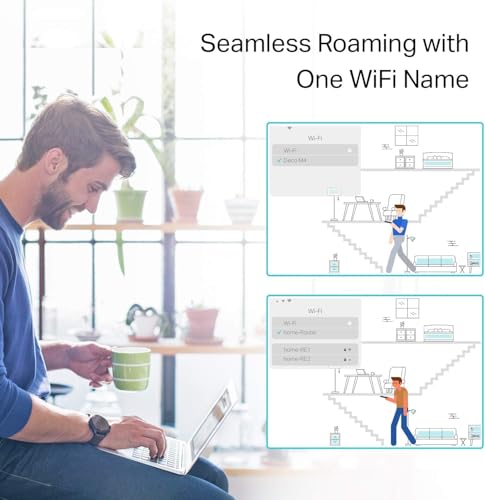
TP-Link Deco S4 Whole Home Mesh WiFi System - Up to 3,800 Sq.ft. Coverage, AC1900 WiFi Router and Extender Replacement, Parental Controls, Deco S4(2-Pack)
- A New Way to WiFi: Deco Mesh technology gives you a better WiFi experience in all directions with faster WiFi
- Better Coverage than traditional WiFi routers: Deco S4 2 units work seamlessly to create a WiFi mesh network t
- Seamless and Stable WiFi Mesh: Rather than wifi range extender that need multiple network names and passwords,
For households where router reboots or connectivity drops cause schedule workarounds, the Keep Connect MAX Router Rebooter automates router monitoring and resets — small detail, but a dropped connection that "accidentally" resets parental controls is a surprisingly common loophole.
6. Parental Digital Habits: The Modelling Problem Nobody Talks About
Children are not watching what you say about screens. They are watching what you do with yours.
The 2024 Pew Research finding — that 46% of teens perceive their parent as phone-distracted during conversation — is not a teen-perception problem. It's a parental-habit problem. And it matters clinically: research from the Digital Wellness Lab at Boston Children's Hospital links parental "technoference" (technology interference in parent-child interaction) to increased child behaviour problems and lower emotional security.
Practical Self-Audit for Parents
That last point — narrating — is underused. When children hear you name your own digital choices out loud, you're teaching metacognition about technology, not just compliance.
For families wanting whole-home visibility into usage patterns — including their own — the Kibosh WiFi 6 Router provides real-time internet history across every device on the network, which can be a useful mirror for parents as much as a control tool for children.




Kibosh Internet Security & Parental Controls 3.0 + Full Mobile (iOS/Android) Control, Malware Blocking, Bandwidth, GPS, History and More. High-Powered WiFi 6 Router w/t Quad-core CPU + 2.5G WAN/LAN!
- Advanced Parental Controls: Take full control over your Internet and every device using it - control Screen Ti
- Sustainable Family Safe Internet: Kibosh produces a very family safe internet by default - it cannot be turned
- Dual-Layer Malware: unique dual-layer Malware 1) Blocking + 2) Monitoring on - every device -unlimited coverag
7. Comparison: Parental Control Approaches by Family Situation
| Approach | Best For | Key Strength | Main Limitation | Recommended Product | Price Range |
|---|---|---|---|---|---|
| Budget mesh router with parental controls | Apartments, renters, small homes | Affordable, flexible, expandable | Covers only ~1,500 sq ft per unit | Gryphon Guardian | $59.99 |
| Mid-range mesh + mobile app | Families needing home + on-the-go control | Network-level + geofencing; can't be uninstalled by kids | Newer product, fewer reviews | JEXtream FX20 | $99.99 |
| Whole-home mesh WiFi 6 | Large homes, multi-device households | Tri-band speed + per-child profiles | Higher upfront cost | Gryphon AX | $299.00 |
| High-rated whole-home mesh | Families prioritising coverage + reliability | 4.5★ from 29,000+ reviews; seamless roaming | Parental controls less granular than dedicated systems | TP-Link Deco S4 | $79.98 |
| Advanced router with GPS + history | Families wanting full visibility + malware blocking | Real-time history, dual-layer malware, GPS | Lower review count; subscription required for full features | Kibosh WiFi 6 Router | $149.95 |
| Router rebooter (add-on) | Any family whose kids exploit connectivity drops | Closes the "connection reset" loophole automatically | Not a standalone control system | Keep Connect MAX | $64.99 |
8. Expert Insights on Family Digital Wellness
Digital wellness isn't a destination you arrive at after one productive weekend of setting up parental controls and writing family agreements. It's an ongoing conversation that evolves as your children grow — what works beautifully at age 6 will need renegotiating at 11, and again at 14. The families who navigate this best aren't the ones with the strictest rules; they're the ones who keep talking about it.
The most quotable truth in all the research is also the simplest: children don't need perfect parents — they need present ones. Every phone you put face-down at dinner, every charger you move to the hallway, every walk you take without earbuds is a deposit in that account.
If this guide helped you, save it, share it with another parent who's in the thick of it, and come back when the next stage brings new challenges — we'll be here.
Sources & References
- Lurie Children's Hospital. "2025 Family Media Survey." 2025. https://www.luriechildrens.org
- Centers for Disease Control and Prevention (CDC). "Youth Screen Time and Mental Health." October 2024. https://www.cdc.gov
- Raffoul A, et al. "Social media use and addictive patterns in children: a longitudinal study." JAMA. 2025.
- American Academy of Pediatrics. "Family Media Plan and Screen Time Guidance." 2023. https://www.healthychildren.org/English/media/Pages/default.aspx
- World Health Organization. "Guidelines on Physical Activity, Sedentary Behaviour and Sleep for Children Under 5 Years of Age." 2019. https://www.who.int
- Royal College of Paediatrics and Child Health. "The Health Impacts of Screen Time: A Guide for Clinicians and Parents." 2023. https://www.rcpch.ac.uk
- Pew Research Center. "Teens and Social Media." 2024 & 2025. https://www.pewresearch.org
- Radesky J, et al. "Patterns of Mobile Device Use by Caregivers and Children During Meals in Fast Food Restaurants." Pediatrics. 2014. (foundational technoference research, University of Michigan)
- Boston Children's Hospital Digital Wellness Lab. Research overview. https://digitalwellnesslab.org
- National Center on Addiction and Substance Abuse (CASA). "The Importance of Family Dinners." Columbia University. https://www.centeronaddiction.org
- Twenge JM, Campbell WK. "Associations between screen time and lower psychological well-being among children and adolescents." Preventive Medicine Reports. 2018.
Frequently Asked Questions
What is the recommended screen time for a 3-year-old?
How do I enforce screen time limits without constant arguments?
Can my child bypass parental controls using a VPN?
Should phones be banned from children's bedrooms at night?
At what age should I give my child their first smartphone?
How do I talk to my teen about reducing social media use without a fight?
Do parental controls work on gaming consoles and smart TVs?
Was this helpful?
Thanks — your feedback helps us pick what to write next.